AU

Project · Build log

Poundo Robot

A robot arm that learns to turn poundo yam from videos of people making it.

Started 19 Oct 2026 · Setup done · Next: understanding the task

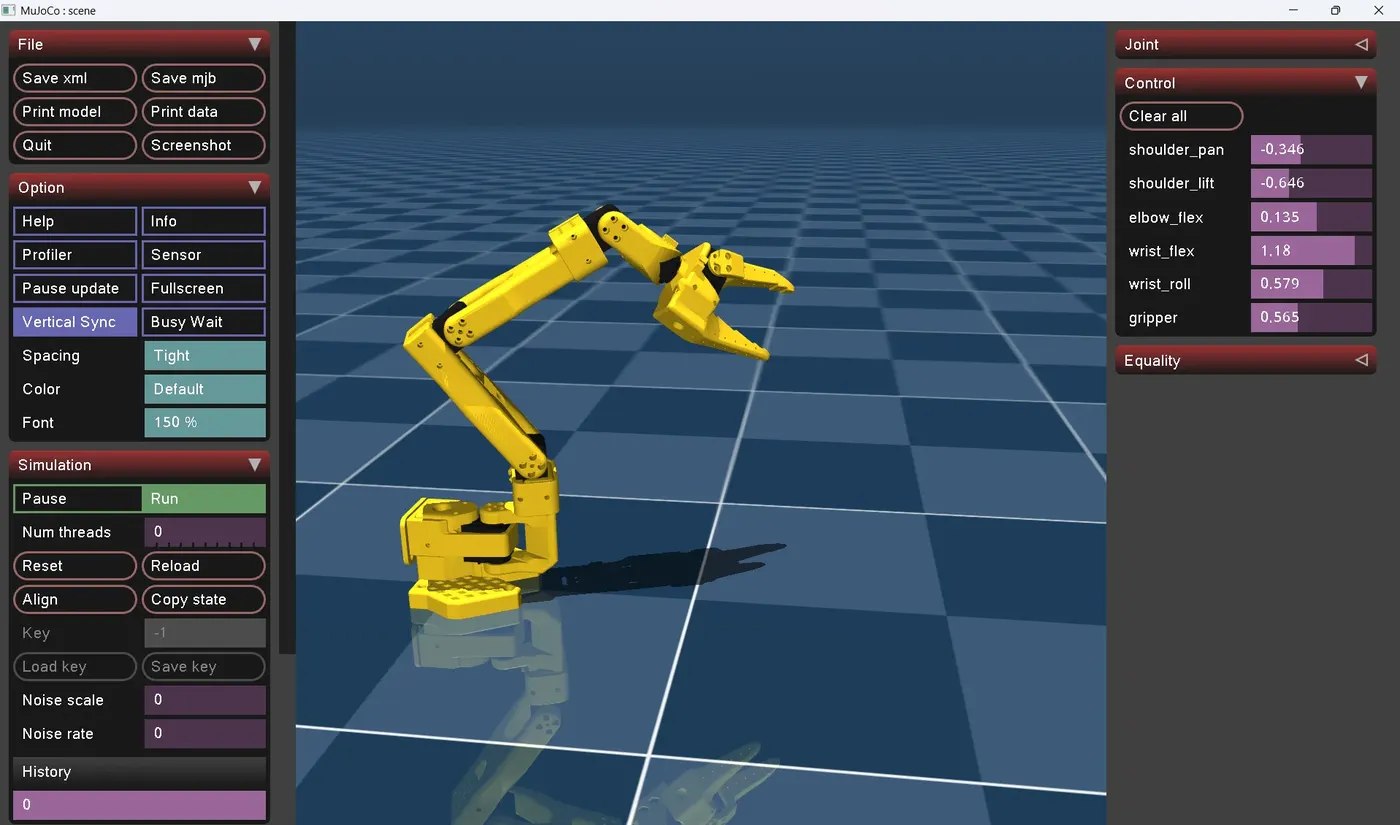
SO-101 robot arm in the MuJoCo simulator with its joint control panel
The SO-101 arm running in MuJoCo on my own machine, with its joint control panel.
01

Poundo, and the problem

Poundo yam is a West African staple and my favourite food. You stir yam flour into hot water, then keep turning it hard with a wooden stick until it's smooth and stretchy. It's tedious, and it takes real effort.

For a robot it's a hard task. The dough starts as loose flour and water and turns into a thick, sticky mass, so the stick is pushing through something whose resistance keeps changing. The pot wants to move. And the only "instructions" that exist are videos of people doing it, which show how the stick moves but not how hard it's being pushed.

02

Goal

Design an arm and a first gripper that turn a pot of poundo from loose flour to smooth, lump-free swallow, with the motion learned from videos of people turning it.

It's also practice in building efficiently: one project, documented as it goes, failures included.

03

Approach

System overview: videos of people turning poundo go through pose and motion extraction, then a policy and inverse kinematics, which drive the SO-101 arm, gripper and stick. A load-cell stick provides force data to the policy. Videos people turning poundo Pose & motion stick tip and hands Policy / IK retarget to the arm SO-101 arm + gripper + wooden stick Load-cell stick force and torque data System overview: videos, then pose and motion extraction, then policy and inverse kinematics, then the SO-101 arm with gripper and stick. A load-cell stick feeds force data into the policy. Videos people turning poundo Pose & motion stick tip and hands Policy / IK retarget to the arm SO-101 arm + gripper + wooden stick Load-cell stick force data

Motion from video. Clips of people turning poundo are tracked for the stick-tip path, then retargeted to the arm with IK.

Force from a sensor. Video can't show force, so a load-cell stick logs what a real turn takes.

SO-101 as the base, redesigned for dough loads, with a gripper holding a plain wooden stick.

Simulation first, in MuJoCo, before anything touches a real pot.

04

Roadmap

  1. P0

    Setup

    Tools installed on Windows; SO-101 sim runs locally.

    Done
  2. P1

    Understand the task

    Stages of turning broken down; 30+ clips collected and curated.

    Up next
  3. P2

    Measure the dough

    Instrumented stick built; peak force and torque logged across stages.

    Not started
  4. P3

    Requirements

    Requirements table set from measured loads.

    Not started
  5. P4

    Mechanical design

    Arm redesigned from the SO-101 base; v1 stick gripper; pot fixture; torque sheet.

    Not started
  6. P5

    Motion from video

    Stick-tip trajectories extracted and retargeted to the arm in sim.

    Not started
  7. P6

    Learning and control

    A policy or scripted mapping replays turning strokes in MuJoCo.

    Not started
  8. P7

    Validation

    Sim beside the original clip; optional real pot test.

    Not started
  9. P8

    Presentation

    A short deck and a demo video.

    Not started
05

Decisions

Build a robot that turns poundo, taught from videos

Why
My own idea from an earlier post. It means something to me, it's a hard contact-rich task, and it puts physical-AI tools to real use.
Also considered
A humanoid ankle, a knee actuator, a finger, a weldment frame, a gesture-driven arm.

v1 end effector: a gripper holding a wooden turning stick

Why
Keeping the human tool means the videos map over directly. Iterate later.
Also considered
A built-in paddle; a scoop.

Start from SO-101 (Apache-2.0), credited, then redesign for dough loads

Why
Open STEP, URDF and MuJoCo files, and it works natively with LeRobot. Its servos are too weak, and that redesign is the design story.
Also considered
AR4 (SolidWorks files, but non-commercial with no redistribution); PAROL6 (STEP files paid, not open).

Instrument a stick with a load cell

Why
Videos give motion but no force.
Also considered
Estimating loads from the literature.

Stay on Windows; use WSL2 only if ROS 2 is needed

Why
SolidWorks is Windows-only, and LeRobot and MuJoCo both run on Windows.
Also considered
Switching to Linux.
06

Build log

  1. SO-101 opens in the MuJoCo viewer. Setup is done.

    Cloned SO-ARM100 and opened the SO-101 model in the MuJoCo viewer on my own machine. That closes P0. Next: break turning into stages and start collecting clips.

  2. Environment up

    Git, Cursor and Miniforge installed; a conda env with Python 3.12 and ffmpeg; LeRobot, MuJoCo and FiftyOne installed and importing. The SO-101 MuJoCo model loads and simulates on MuJoCo 3.16.0, with 6 joints and 6 actuators.

  3. Kickoff

    Picked the project, wrote the brief, and compared open base arms: SO-101 (Apache-2.0), AR4 MK5 (non-commercial licence), PAROL6 (paid STEP). Chose SO-101 and decided to stay on Windows. Set up the engineering log and a task board. Learned: video only gives kinematics, so force has to come from my own measurements, and open-hardware licences differ a lot.

07

Open questions

  1. Copy the human motion, or learn the goal: smooth, lump-free swallow?
  2. How does the robot tell the dough is done: motor current, a camera, or stroke count?
  3. What holds the pot: a fixture, a second arm, or a smarter stroke?
  4. What breaks first under peak load: the stick, the grip, the wrist, or the fixture?
  5. What are the real peak force and torque at the stick? That's what P2 is for.
08

Credits

SO-ARM100 / SO-101 by The Robot Studio, released under the Apache-2.0 licence. The base arm and its MuJoCo model come from here; my redesign builds on it.

MuJoCo, the physics simulator the arm runs in.

LeRobot by Hugging Face, for robot learning and the SO-101 integration.

FiftyOne by Voxel51, for curating the video clips.

← All projects Email